If you've ever been told that a "real" Puppet installation means a Puppet Enterprise license, this post is the counterargument, written as a runbook you can follow.
I want to be plain about the goal. The community does not need Perforce to run an enterprise-class Puppet estate. OpenVox, the community continuation of Puppet maintained by Vox Pupuli, gives you the language you already know, the server, the database, the agent, and r10k. Add a load balancer, PostgreSQL, and a console, and you have clustering, a large installation, a capable ENC and GUI, and the rest of the tooling. The package names changed. The commands did not. puppet, puppetserver, and /etc/puppetlabs are all still right where you left them.
What follows is the layout I reach for once an estate is past the hobby stage. I've been building configuration management infrastructure for a long time, and I've watched more than one "single server, we'll scale it later" install turn into a 2 a.m. outage. This one has an independent Certificate Authority, a dedicated OpenVoxDB node on its own PostgreSQL server, two catalog compilers behind a single service name, and a dedicated OpenVox-GUI console so humans can see what's going on.
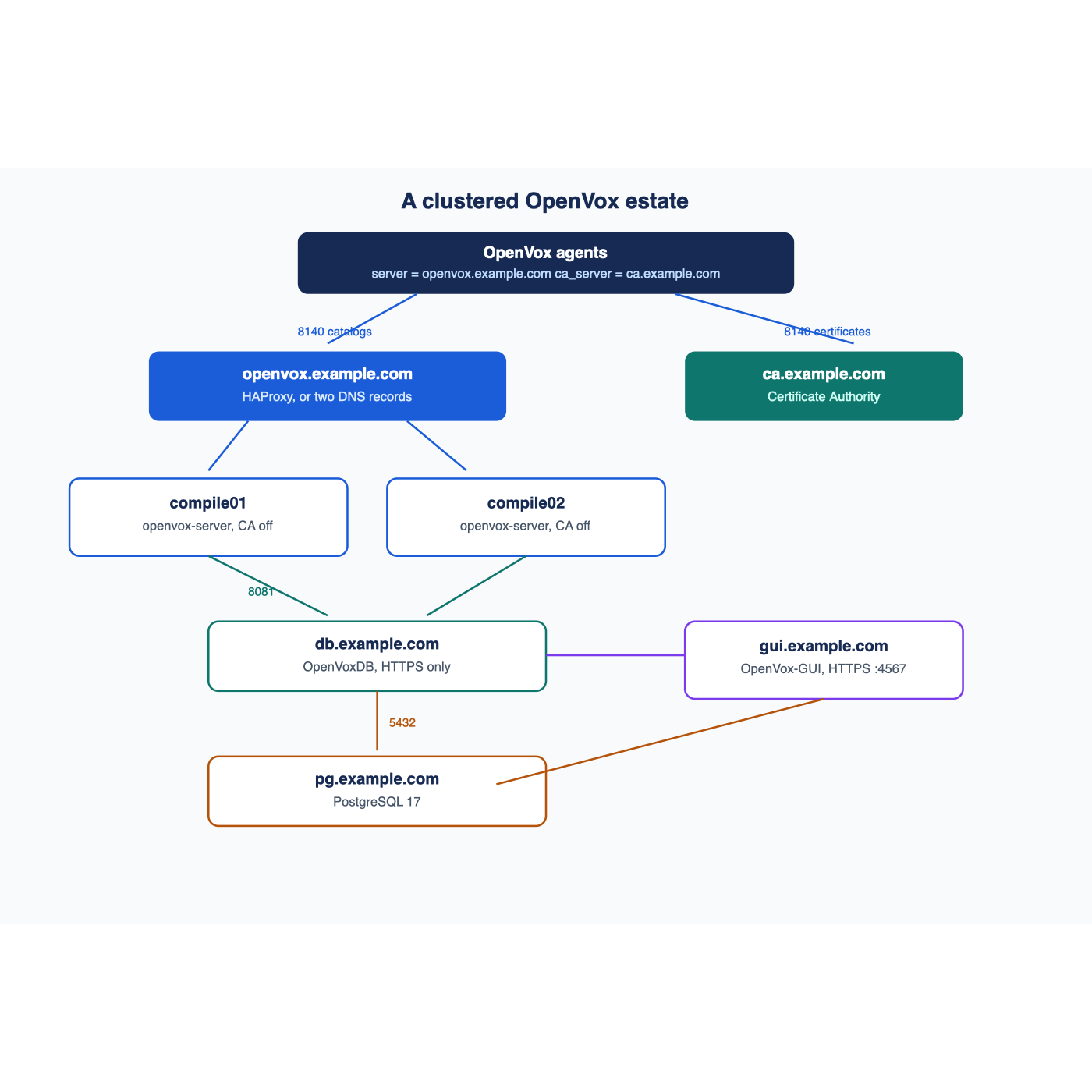
It's a runbook, so read it once and then go build it. Everything lives under example.com, and the IP addresses come from the documentation range 192.0.2.0/24. Swap in your own. Commands run as root unless noted. The reference platform is AlmaLinux 10, and I show the Debian and Ubuntu variation where it differs.
I've been building configuration management infrastructure for a long time. Over 35 years in IT, I've watched more than one "single server, we'll scale it later" Puppet install turn into a 2 a.m. outage once the fleet outgrew it. This runbook lays out the layout I reach for once an estate is past the hobby stage. It has an independent Certificate Authority, a dedicated OpenVoxDB node with its own PostgreSQL server, two catalog compilers behind a single service name (a VIP), and a dedicated OpenVox-GUI console so humans can see what's going on.
Everything here is plain, open-source OpenVox, the community fork of Puppet maintained by the folks at Vox Pupuli. They do the heavy lifting of building, packaging, and releasing OpenVox, and the whole community owes them a thank-you. Commands, config files, and paths match what you already know from Puppet (puppet, puppetserver, /etc/puppetlabs/...). Only the package names changed.
This is a runbook, so it's written to be followed top to bottom. Read it all once, then go build it.
> Conventions: Everything lives under example.com. IP addresses come from the documentation range 192.0.2.0/24. Swap in your own. Commands run as root (or with sudo) unless noted. The reference platform is AlmaLinux 10. Where a step differs on Debian or Ubuntu, I show both.
---
1. Architecture Overview
Here's what we're building:
                         ┌──────────────────────────────┐
                         │        OpenVox agents        │
                         │  server    = openvox.example.com
                         │  ca_server = ca.example.com  │
                         └──────┬───────────────┬───────┘
                   catalogs,    │               │  certificate requests,
                   facts,       │ 8140          │  CRL downloads
                   reports      ▼               │ 8140
                ┌──────────────────────────┐    │
                │  VIP: openvox.example.com│    │
                │  Option A: HAProxy (TCP) │    │
                │  Option B: DNS round-robin    │
                └──────┬─────────────┬─────┘    │
                       │ 8140        │ 8140     ▼
              ┌────────▼───┐   ┌─────▼──────┐  ┌──────────────────┐
              │ compile01  │   │ compile02  │  │  ca.example.com  │
              │ openvox-   │   │ openvox-   │  │  openvox-server  │
              │ server     │   │ server     │  │  (CA enabled)    │
              │ CA disabled│   │ CA disabled│  └──────────────────┘
              └─────┬──────┘   └─────┬──────┘
                    │  8081 (HTTPS, mutual TLS)
                    ▼                ▼
                ┌──────────────────────────┐        ┌───────────────────┐
                │      db.example.com      │◄───────┤  gui.example.com  │
                │        OpenVoxDB         │  8081  │   OpenVox-GUI     │
                │      (HTTPS only)        │        │   (HTTPS :4567)   │
                └────────────┬─────────────┘        └─────────┬─────────┘
                             │ 5432 (TLS)                     │ 5432 (TLS)
                             ▼                                │
                ┌──────────────────────────┐                  │
                │      pg.example.com      │◄─────────────────┘
                │      PostgreSQL          │
                │  DBs: openvoxdb,         │
                │       openvox_gui        │
                └──────────────────────────┘
GUI → compilers and CA on 8140 for status, metrics, and certificate management.
Host and role table
| Host | Example IP | Role | Key packages | Listens on |
|---|---|---|---|---|
| ca.example.com | 192.0.2.10 | Certificate Authority only | openvox-server | 8140/tcp |
| pg.example.com | 192.0.2.11 | PostgreSQL for OpenVoxDB (and the GUI's own database) | PostgreSQL server + contrib | 5432/tcp |
| db.example.com | 192.0.2.12 | OpenVoxDB | openvoxdb, openvox-agent | 8081/tcp (HTTPS only) |
| compile01.example.com | 192.0.2.21 | Catalog compiler | openvox-server, openvoxdb-termini | 8140/tcp |
| compile02.example.com | 192.0.2.22 | Catalog compiler | openvox-server, openvoxdb-termini | 8140/tcp |
| lb01.example.com | 192.0.2.30 | HAProxy (Option A only) | haproxy | 8140/tcp |
| openvox.example.com | 192.0.2.30 (Option A) or A records → .21 and .22 (Option B) | The VIP: the name every agent uses as server | n/a | 8140/tcp |
| gui.example.com | 192.0.2.40 | OpenVox-GUI console | openvox-agent, openvox-gui | 4567/tcp |
Traffic flows (your firewall checklist)
| From | To | Port | Purpose |
|---|---|---|---|
| All agents, compilers, db, pg, gui | ca.example.com | 8140 | Certificate requests, CA cert and CRL downloads |
| Agents | openvox.example.com (VIP) | 8140 | Catalogs, facts, file content, reports |
| HAProxy (Option A) or agents directly (Option B) | compile01, compile02 | 8140 | Compiler traffic |
| compile01, compile02, gui | db.example.com | 8081 | OpenVoxDB (storeconfigs, facts, reports, queries) |
| db.example.com, gui.example.com | pg.example.com | 5432 | PostgreSQL |
| Admin workstations | gui.example.com | 4567 | OpenVox-GUI web UI |
| gui.example.com | compilers, ca, db | 22 | Bolt over SSH, only if you use the GUI's cluster code-deploy and orchestration features |
Why split it this way?
- The CA is the crown jewel. If it lives on its own box, you can scale, rebuild, or throw away compilers without touching your trust root. Compilers become cattle.
- Compilers scale horizontally. Catalog compilation is the main bottleneck in any sizable OpenVox estate. Two compilers behind one name gives you capacity and the ability to patch one while the other serves.
- OpenVoxDB and PostgreSQL get their own resources. The JVM on OpenVoxDB and the PostgreSQL buffer cache both want RAM. Keeping them apart from the compilers stops them fighting.
- The GUI is a client of everything and the host of nothing. It doesn't run
openvox-serverat all.
2. Prerequisites
2.1 Operating systems
The reference platform for this runbook is AlmaLinux 10. The same steps work on the rest of the EL10 family (RHEL 10, Rocky 10) and on current Debian and Ubuntu LTS releases. You can mix them. The Vox Pupuli repos serve all of them.
2.2 Sizing starting points
These are sane starting points for a few thousand agents, not hard requirements:
| Role | vCPU | RAM | Disk |
|---|---|---|---|
| CA | 2 | 4 GB | 20 GB |
| Compiler (each) | 4–8 | 8–16 GB | 40 GB |
| OpenVoxDB | 4 | 8 GB | 40 GB |
| PostgreSQL | 4 | 8–16 GB | 100 GB+ on fast SSD |
| HAProxy | 2 | 2 GB | 20 GB |
| OpenVox-GUI | 2 | 4 GB (2 GB minimum per the project's docs) | 20 GB |
2.3 DNS
Every host needs working forward and reverse DNS, and hostname -f must return the FQDN. Certificates are issued to FQDNs, and nothing in this stack forgives sloppy naming.
bash
hostnamectl set-hostname compile01.example.com
hostname -f        # must print compile01.example.com
Create A records for every host in the table. For openvox.example.com:
- Option A (HAProxy): one A record pointing at the HAProxy host's own address.
- Option B (DNS RR): two A records, one for each compiler. Section 7 covers this.
2.4 Time sync
TLS and certificate validity depend on clocks that agree. Run chrony everywhere:
bash
AlmaLinux 10
dnf install -y chrony && systemctl enable --now chronydDebian/Ubuntu
apt-get install -y chrony && systemctl enable --now chronychronyc tracking   # confirm you're synced
2.5 Firewall
Open only what each role needs (see the traffic table above). Examples:
bash
AlmaLinux 10 (firewalld). Example for a compiler:
firewall-cmd --permanent --add-port=8140/tcp
firewall-cmd --reloadDebian/Ubuntu (ufw). Example for the OpenVoxDB node, compilers + GUI only:
ufw allow from 192.0.2.21 to any port 8081 proto tcp
ufw allow from 192.0.2.22 to any port 8081 proto tcp
ufw allow from 192.0.2.40 to any port 8081 proto tcp
On AlmaLinux 10, leave SELinux enforcing. The packaged services run fine under it.
2.6 The Vox Pupuli package repositories
Install the OpenVox 9 release package on every node that will run an OpenVox component (all of them except lb01 and, strictly speaking, pg. I install the agent on pg too, so it gets a certificate for PostgreSQL TLS. More on that in Section 4).
OpenVox 9 is the current release. If you need OpenVox 8 instead, swap openvox9 for openvox8 in the package name below and everything else in this runbook stays the same.
bash
AlmaLinux 10
dnf install -y https://yum.voxpupuli.org/openvox9-release-el-10.noarch.rpmUbuntu 24.04 (use openvox9-release-ubuntu22.04.deb, openvox9-release-debian12.deb, etc. as appropriate)
wget https://apt.voxpupuli.org/openvox9-release-ubuntu24.04.deb
dpkg -i openvox9-release-ubuntu24.04.deb
apt-get update
Vox Pupuli publishes the repository signing key fingerprint as 0E26 4299 8700 2418 F951 3F2A 5FB9 99C2 D62F F3D9. Check it against the key your package manager imports.
The packages we'll use:
| Package | Installed on | What it is |
|---|---|---|
| openvox-agent | every managed node (pulled in automatically by openvox-server) | The agent, puppet CLI, bundled Ruby |
| openvox-server | ca, compile01, compile02 | Server (service name puppetserver) |
| openvoxdb | db | OpenVoxDB (service name puppetdb) |
| openvoxdb-termini | compile01, compile02 | Lets the server talk to OpenVoxDB |
Binaries land in /opt/puppetlabs/bin. If puppet isn't on your path after install, either log out and back in or run:
bash
export PATH=/opt/puppetlabs/bin:$PATH
2.7 Build order
Order matters because everything trusts the CA:
1. CA (ca)
2. Agent certificates for pg, db, gui (cheap to do early)
3. PostgreSQL (pg)
4. OpenVoxDB (db)
5. Compilers (compile01, compile02)
6. VIP (HAProxy or DNS RR)
7. OpenVox-GUI (gui)
8. Verify, then point agents at it
---
3. The Independent CA Node (ca.example.com)
3.1 Install and configure
bash
AlmaLinux 10
dnf install -y openvox-server
Debian/Ubuntu
apt-get install -y openvox-server
Set the CA host's own puppet.conf. Its agent fetches catalogs from the compilers like everyone else, but it is the CA:
bash
puppet config set certname   ca.example.com          --section main
puppet config set server     openvox.example.com     --section main
puppet config set ca_server  ca.example.com          --section main
The CA node keeps the default /etc/puppetlabs/puppetserver/services.d/ca.cfg, with the CA service enabled. Don't touch it here.
3.2 Allow certificates with subject alternative names
Compilers will request certificates that carry dns_alt_names (the VIP name). By default, puppetserver ca sign refuses a CSR with alt names. Allow it in /etc/puppetlabs/puppetserver/conf.d/ca.conf:
hocon
certificate-authority: {
    # Required so we can sign compiler CSRs that include the VIP name
    allow-subject-alt-names: true
}
Leave autosigning off (the default). In a clustered build you want a human, or a deliberate policy-based autosign script, deciding who joins.
3.3 Generate the CA and start the service
bash
puppetserver ca setup        # creates the root + intermediate CA under /etc/puppetlabs/puppetserver/ca
systemctl enable --now puppetserver
Open 8140 to your whole network. Every agent talks to the CA at least once.
bash
firewall-cmd --permanent --add-port=8140/tcp && firewall-cmd --reload   # AlmaLinux 10
ufw allow 8140/tcp                                                        # Debian/Ubuntu
3.4 How agents and compilers find the CA
Every node in the estate gets these two settings in [main] of /etc/puppetlabs/puppet/puppet.conf:
ini
[main]
server    = openvox.example.com
ca_server = ca.example.com
server sends catalog, fact, file, and report traffic to the VIP. ca_server sends certificate requests, CA cert downloads, and CRL downloads straight to the CA. Compilers get ca_server too. That's how they get their own certificates.
(Prefer DNS to config files? OpenVox supports SRV records, _x-puppet._tcp for servers and _x-puppet-ca._tcp for the CA, through use_srv_records. I stick with explicit settings in this runbook because they're easier to reason about at 2 a.m.)
3.5 Signing certificates, especially compilers with alt names
When a CSR arrives, list it and read it before you sign:
bash
puppetserver ca list
Requested Certificates:
compile01.example.com (SHA256) AB:CD:... alt names: ["DNS:compile01.example.com", "DNS:openvox.example.com", "DNS:openvox"]
puppetserver ca sign --certname compile01.example.com
Only compilers should ever carry the VIP name. If an ordinary agent shows up asking for DNS:openvox.example.com, that's a red flag. Don't sign it.
If you sign a compiler before you've set dns_alt_names, you have to reissue its certificate:
bash
On the compiler
puppet ssl clean
On the CA
puppetserver ca clean --certname compile01.example.com
On the compiler (after fixing dns_alt_names)
puppet ssl bootstrap --waitforcert 60
On the CA
puppetserver ca sign --certname compile01.example.com
3.6 CRL distribution
Revocation only matters if everyone hears about it. Here's how the CRL moves through this design:
- The CA keeps its master CRL in its cadir (
/etc/puppetlabs/puppetserver/ca/ca_crl.pem).puppetserver ca revokeandpuppetserver ca cleanupdate it. - Agents and compilers download the CRL from
ca_serverand cache it athostcrl(/etc/puppetlabs/puppet/ssl/crl.pem). The agent refreshes it on a schedule set bycrl_refresh_interval, every 24 hours by default. - Compilers enforce the CRL on incoming connections through
ssl-crl-pathinwebserver.conf(Section 6), which points at that samecrl.pem.
ssl-crl-path:bash
On compile01 and compile02
puppet agent -t
systemctl reload puppetserver
3.7 Back up the CA
Back up /etc/puppetlabs/puppetserver/ca somewhere safe and off-box, today. Lose it and you're re-signing every node you own.
---
4. The PostgreSQL Node (pg.example.com)
OpenVoxDB stores everything in PostgreSQL. The OpenVoxDB docs recommend PostgreSQL 14 or newer (11 is the floor). This runbook uses PostgreSQL 17.
4.1 Get a certificate for this host first
I like to reuse the OpenVox CA for PostgreSQL TLS. That way OpenVoxDB can verify PostgreSQL against a CA it already trusts. Install the agent, request a cert, and sign it:
bash
On pg (after installing the openvox9 release package from Section 2.6)
dnf install -y openvox-agent        # or: apt-get install -y openvox-agent
puppet config set server    openvox.example.com --section main
puppet config set ca_server ca.example.com      --section main
puppet ssl bootstrap --waitforcert 60On ca
puppetserver ca sign --certname pg.example.com
Do the same now for db.example.com and gui.example.com. You'll need their certs shortly.
4.2 Install PostgreSQL and the contrib package
pg_trgm lives in the contrib package on most distros. Don't skip it.
AlmaLinux 10 AppStream ships PostgreSQL 16, so PostgreSQL 17 comes from the PostgreSQL Global Development Group (PGDG) yum repository. On Debian or Ubuntu, use the PGDG apt repository the same way and install postgresql-17.
bash
AlmaLinux 10
dnf install -y https://dl.fedoraproject.org/pub/epel/epel-release-latest-10.noarch.rpm
crb enable
dnf install -y https://download.postgresql.org/pub/repos/yum/reporpms/EL-10-x86_64/pgdg-redhat-repo-latest.noarch.rpm
dnf -qy module disable postgresql
dnf install -y postgresql17-server postgresql17 postgresql17-contrib
/usr/pgsql-17/bin/postgresql-17-setup initdb
systemctl enable --now postgresql-17
Data and config for this install both live in /var/lib/pgsql/17/data/ (postgresql.conf and pg_hba.conf are in that directory). The service name is postgresql-17, and the client binaries are in /usr/pgsql-17/bin. Add that directory to your PATH for the rest of this section, or call psql by its full path.
4.3 Create the openvoxdb database and users
This follows the OpenVoxDB docs' recipe: a main user who owns the schema objects, and a read-only user for query traffic.
bash
sudo -u postgres createuser -DRSP openvoxdb
sudo -u postgres createuser -DRSP openvoxdb_read
sudo -u postgres createdb -E UTF8 -O postgres openvoxdb
Then lock down the schema and enable pg_trgm:
bash
sudo -u postgres psql openvoxdb <<'SQL'
REVOKE CREATE ON SCHEMA public FROM public;
GRANT CREATE ON SCHEMA public TO openvoxdb;ALTER DEFAULT PRIVILEGES FOR USER openvoxdb IN SCHEMA public
GRANT SELECT ON TABLES TO openvoxdb_read;
ALTER DEFAULT PRIVILEGES FOR USER openvoxdb IN SCHEMA public
GRANT USAGE ON SEQUENCES TO openvoxdb_read;
ALTER DEFAULT PRIVILEGES FOR USER openvoxdb IN SCHEMA public
GRANT EXECUTE ON FUNCTIONS TO openvoxdb_read;
GRANT openvoxdb_read TO openvoxdb;
CREATE EXTENSION IF NOT EXISTS pg_trgm;
SQL
> The upstream docs name the database puppetdb. I use openvoxdb here to match the product. The name is arbitrary. Just make it match database.ini in Section 5.
4.4 Listen on the network and require TLS
In postgresql.conf:
ini
listen_addresses = '*'          # or the specific interface IP
password_encryption = scram-sha-256
ssl = on
ssl_cert_file = 'server.crt'
ssl_key_file  = 'server.key'
ssl_ca_file   = 'root.crt'
Put the OpenVox-issued cert, key, and CA in the data directory, owned by postgres:
bash
PGDATA=/var/lib/pgsql/17/data          # Debian/Ubuntu PGDG: /var/lib/postgresql/17/main
cp /etc/puppetlabs/puppet/ssl/certs/pg.example.com.pem        $PGDATA/server.crt
cp /etc/puppetlabs/puppet/ssl/private_keys/pg.example.com.pem $PGDATA/server.key
cp /etc/puppetlabs/puppet/ssl/certs/ca.pem                    $PGDATA/root.crt
chown postgres:postgres $PGDATA/server.crt $PGDATA/server.key $PGDATA/root.crt
chmod 0600 $PGDATA/server.key
> On Debian/Ubuntu, the ssl_*_file settings are relative to the data directory, but the packaged postgresql.conf already points ssl_cert_file and ssl_key_file at the snakeoil cert. Use absolute paths there, or replace those lines.
Set a password for the OpenVoxDB roles:
bash
sudo -u postgres psql -c "ALTER ROLE openvoxdb      PASSWORD 'CHANGE-ME-main';"
sudo -u postgres psql -c "ALTER ROLE openvoxdb_read PASSWORD 'CHANGE-ME-read';"
4.5 pg_hba.conf
Only the OpenVoxDB host gets in, only over TLS, and only with SCRAM passwords:
TYPE    DATABASE     USER                        ADDRESS          METHOD
local     all          postgres                                     peer
hostssl   openvoxdb    openvoxdb,openvoxdb_read    192.0.2.12/32    scram-sha-256
We'll add a line for the GUI's own database in Section 9. Restart and open the port to the db (and gui) hosts only:
bash
systemctl restart postgresql-17
firewall-cmd --permanent --add-rich-rule='rule family=ipv4 source address=192.0.2.12/32 port port=5432 protocol=tcp accept'
firewall-cmd --permanent --add-rich-rule='rule family=ipv4 source address=192.0.2.40/32 port port=5432 protocol=tcp accept'
firewall-cmd --reload
Want to go further? PostgreSQL can also authenticate OpenVoxDB by client certificate (hostssl ... cert or clientcert=verify-full plus a pg_ident.conf map). The OpenVoxDB docs cover it. Password plus TLS with verify-full is a solid baseline and easier to troubleshoot.
4.6 A little tuning
For a dedicated PostgreSQL host, start with shared_buffers at about 25% of RAM, effective_cache_size at 50–75%, and max_connections with headroom for OpenVoxDB's connection pools (the defaults are fine for a single OpenVoxDB node). Leave autovacuum on. OpenVoxDB churns rows constantly.
---
5. The OpenVoxDB Node (db.example.com)
5.1 Install
You already got this node a signed agent certificate in Section 4.1. Install OpenVoxDB:
bash
dnf install -y openvoxdb          # or: apt-get install -y openvoxdb
5.2 Copy the agent certificate into OpenVoxDB's SSL directory
OpenVoxDB serves HTTPS with the node's OpenVox agent certificate, copied to /etc/puppetlabs/puppetdb/ssl/ as public.pem, private.pem, and ca.pem:
bash
PDB_SSLDIR=/etc/puppetlabs/puppetdb/ssl
AGENT_SSL=$(puppet config print ssldir)
CERTNAME=$(puppet config print certname)install -d -o puppetdb -g puppetdb -m 0700 "$PDB_SSLDIR"
cp -a "$AGENT_SSL/private_keys/${CERTNAME}.pem" "$PDB_SSLDIR/private.pem"
cp -a "$AGENT_SSL/certs/${CERTNAME}.pem" "$PDB_SSLDIR/public.pem"
cp -a "$AGENT_SSL/certs/ca.pem" "$PDB_SSLDIR/ca.pem"
chown puppetdb:puppetdb "$PDB_SSLDIR"/*.pem
chmod 0600 "$PDB_SSLDIR"/*.pem
ls -l "$PDB_SSLDIR"
5.3 Point it at PostgreSQL (database.ini)
Edit /etc/puppetlabs/puppetdb/conf.d/database.ini. Use verify-full so OpenVoxDB checks that it's really talking to pg.example.com, signed by our CA:
ini
[database]
subname  = //pg.example.com:5432/openvoxdb?ssl=true&sslfactory=org.postgresql.ssl.LibPQFactory&sslmode=verify-full&sslrootcert=/etc/puppetlabs/puppetdb/ssl/ca.pem
username = openvoxdb
password = CHANGE-ME-main[read-database]
subname  = //pg.example.com:5432/openvoxdb?ssl=true&sslfactory=org.postgresql.ssl.LibPQFactory&sslmode=verify-full&sslrootcert=/etc/puppetlabs/puppetdb/ssl/ca.pem
username = openvoxdb_read
password = CHANGE-ME-read
Lock down the file, since it holds passwords:
bash
chown puppetdb:puppetdb /etc/puppetlabs/puppetdb/conf.d/database.ini
chmod 0640 /etc/puppetlabs/puppetdb/conf.d/database.ini
5.4 HTTPS on 8081 only (jetty.ini)
Out of the box, OpenVoxDB also listens for plaintext HTTP on localhost:8080. In this design nothing needs it, so turn it off. If port isn't set, OpenVoxDB doesn't open a plaintext listener at all.
/etc/puppetlabs/puppetdb/conf.d/jetty.ini:
ini
[jetty]
Plaintext listener disabled. Do not set host/port.
host = localhost
port = 8080
ssl-host = 0.0.0.0
ssl-port = 8081
ssl-key = /etc/puppetlabs/puppetdb/ssl/private.pem
ssl-cert = /etc/puppetlabs/puppetdb/ssl/public.pem
ssl-ca-cert = /etc/puppetlabs/puppetdb/ssl/ca.pem
5.5 Who can talk to it
By default, any client with a certificate signed by our CA can talk to OpenVoxDB. That's what this build uses, and it's enough when the CA only signs hosts you trust.
If you want to tighten it, OpenVoxDB can require an exact certname match against a file. Add this under [puppetdb] in /etc/puppetlabs/puppetdb/conf.d/config.ini:
ini
[puppetdb]
certificate-allowlist = /etc/puppetlabs/puppetdb/certificate-allowlist
bash
cat > /etc/puppetlabs/puppetdb/certificate-allowlist <<'LIST'
compile01.example.com
compile02.example.com
gui.example.com
db.example.com
LIST
Every compiler you ever add must go in this list. Forgetting it is the "new compiler can't submit facts" ticket this setting creates. Older PuppetDB releases called the same setting certificate-whitelist.
5.6 Memory and start
Give the JVM a sensible heap in /etc/sysconfig/puppetdb (EL) or /etc/default/puppetdb (Debian/Ubuntu), for example -Xmx2g on an 8 GB box. Then:
bash
systemctl enable --now puppetdb
tail -f /var/log/puppetlabs/puppetdb/puppetdb.log     # watch the schema migrations finish
Open 8081 to the compilers and the GUI only (firewall examples in Section 2.5).
5.7 Health check (with certs)
Confirm 8081 is up and 8080 is gone:
bash
ss -ltnp | grep -E ':(8080|8081)\b'     # expect only :8081
The quick check is the simple status endpoint. You want the body running:
bash
curl -k https://db.example.com:8081/status/v1/simple
For the per-service detail, hit the status service over mutual TLS with this node's own agent certificate. You want "state": "running" in the JSON:
bash
curl -s https://db.example.com:8081/status/v1/services/puppetdb-status \
  --cacert $(puppet config print localcacert) \
  --cert   $(puppet config print hostcert) \
  --key    $(puppet config print hostprivkey)
---
6. The Two Compilers (compile01 and compile02)
Do everything in this section on both compilers, changing only the hostname.
6.1 Install
bash
dnf install -y openvox-server openvoxdb-termini      # or apt-get install -y ...
6.2 puppet.conf, before any certificate exists
The dns_alt_names setting must be in place before the compiler generates its CSR. It needs the compiler's own name and the VIP name, because agents will connect to openvox.example.com and land on whichever compiler serves them.
/etc/puppetlabs/puppet/puppet.conf on compile01:
ini
[main]
certname             = compile01.example.com
server               = openvox.example.com
ca_server            = ca.example.com
dns_alt_names        = compile01.example.com,compile01,openvox.example.com,openvox[server]
storeconfigs         = true
storeconfigs_backend = puppetdb
reports              = store,puppetdb
A couple of notes:
- If you override
ssldir, set it in[main]only. Setting it in a different section on a compiler causes much confusion. - The upstream docs sometimes show these settings under
[master].[server]is the current name for that section.
6.3 Disable the CA service on the compiler
Edit /etc/puppetlabs/puppetserver/services.d/ca.cfg. Comment out the CA service and enable the disabled-CA service:
To enable the CA service, leave the following line uncommented
#puppetlabs.services.ca.certificate-authority-service/certificate-authority-service
To disable the CA service, comment out the above line and uncomment the line below
puppetlabs.services.ca.certificate-authority-disabled-service/certificate-authority-disabled-service
puppetlabs.trapperkeeper.services.watcher.filesystem-watch-service/filesystem-watch-service
6.4 Point the web server at the agent certificate
Because the compiler isn't a CA, tell its web server which cert, key, CA, and CRL to use. In /etc/puppetlabs/puppetserver/conf.d/webserver.conf:
hocon
webserver: {
    access-log-config: /etc/puppetlabs/puppetserver/request-logging.xml
    client-auth: want
    ssl-host: 0.0.0.0
    ssl-port: 8140
    ssl-cert:     /etc/puppetlabs/puppet/ssl/certs/compile01.example.com.pem
    ssl-key:      /etc/puppetlabs/puppet/ssl/private_keys/compile01.example.com.pem
    ssl-ca-cert:  /etc/puppetlabs/puppet/ssl/certs/ca.pem
    ssl-crl-path: /etc/puppetlabs/puppet/ssl/crl.pem
}
6.5 Get the compiler's certificate from the CA
bash
On compile01
puppet ssl bootstrap --waitforcert 60On ca, check the alt names, then sign
puppetserver ca list
puppetserver ca sign --certname compile01.example.com
Confirm the SANs made it in:
bash
openssl x509 -in /etc/puppetlabs/puppet/ssl/certs/compile01.example.com.pem -noout -ext subjectAltName
X509v3 Subject Alternative Name:
    DNS:compile01, DNS:compile01.example.com, DNS:openvox, DNS:openvox.example.com
6.6 Connect the compiler to OpenVoxDB
/etc/puppetlabs/puppet/puppetdb.conf:
ini
[main]
server_urls = https://db.example.com:8081
Then the routes file. Find the path with puppet config print route_file --section server (normally /etc/puppetlabs/puppet/routes.yaml). The master: key is the one this build uses:
yaml
---
master:
  facts:
    terminus: puppetdb
    cache: yaml
  catalog:
    terminus: compiler
    cache: puppetdb
  resource:
    terminus: puppetdb
Make sure ownership is right, since the server runs as puppet:
bash
chown -R puppet:puppet $(puppet config print confdir)
6.7 JRuby and heap sizing
Each JRuby instance compiles one catalog at a time, so the JRuby count is your concurrency. Per the server tuning guidance:
max-active-instances(in/etc/puppetlabs/puppetserver/conf.d/puppetserver.conf, underjruby-puppet) defaults to CPUs − 1, with a minimum of 1 and a maximum of 4. On a compiler with 8 cores, set it explicitly to about the core count.- Heap: start at roughly 512 MB + (JRubies × 512 MB). Set it in
JAVA_ARGSin/etc/sysconfig/puppetserver(EL) or/etc/default/puppetserver(Debian/Ubuntu). ReservedCodeCacheSize: 512m is normal. Use 1G when you run 6–12 JRubies.
hocon
puppetserver.conf
jruby-puppet: {
    max-active-instances: 7
    # ...leave the other defaults alone
}
bash
/etc/sysconfig/puppetserver  (or /etc/default/puppetserver)
JAVA_ARGS="-Xms4g -Xmx4g -XX:ReservedCodeCacheSize=1g"
6.8 Start it
bash
systemctl enable --now puppetserver
firewall-cmd --permanent --add-port=8140/tcp && firewall-cmd --reload
tail -f /var/log/puppetlabs/puppetserver/puppetserver.log
A quick local health check:
bash
curl -s https://compile01.example.com:8140/status/v1/simple \
  --cacert $(puppet config print localcacert)
running
6.9 Code deployment: keep both compilers identical
With two compilers, both must serve the exact same code at the same moment. Otherwise an agent's catalog depends on which compiler it happened to hit. The open-source tools for this are well worn:
- r10k on each compiler, deploying environments from your control repo:
bash
  /opt/puppetlabs/puppet/bin/gem install r10k
  # /etc/puppetlabs/r10k/r10k.yaml points at your control repo
  r10k deploy environment production -pv
- g10k is a fast, Go-based r10k-compatible alternative that a lot of people like for large Puppetfiles.
- Trigger deployments the same way on both nodes. Options include a webhook receiver on each compiler (Vox Pupuli maintains webhook-go for exactly this), a cron job that runs r10k on both, or deploying on one and
rsync-ing/etc/puppetlabs/codeto the other.
---
7. The VIP: openvox.example.com
Agents need one name to point at. You have two reasonable ways to provide it.
Whichever you pick, two rules hold:
1. Agents use server = openvox.example.com. Never a compiler's own name.
2. openvox.example.com must be in every compiler's dns_alt_names. The TLS session goes end-to-end between agent and compiler, so the compiler's certificate has to be valid for the name the agent dialed.
Option A: A dedicated HAProxy node (recommended)
HAProxy runs in TCP mode, passing the TLS stream straight through to a compiler. Don't terminate TLS on the load balancer. OpenVox authenticates agents by client certificate, and terminating TLS at the LB throws that away.
The Vox Pupuli load-balancing reference recommends leastconn. Agent connections vary a lot in length (a catalog compile is not a file metadata check), so round-robin balancing tends to pile up work on one compiler.
Install on lb01.example.com:
bash
dnf install -y haproxy        # or: apt-get install -y haproxy
/etc/haproxy/haproxy.cfg:
global
log /dev/log local0
maxconn 8000
user haproxy
group haproxy
daemondefaults
mode tcp
log global
option tcplog
option dontlognull
timeout connect 5s
timeout client 10m
timeout server 10m
retries 3
frontend openvox_compilers_8140
bind *:8140
default_backend openvox_compilers
backend openvox_compilers
balance leastconn
# Health check: TLS to each compiler, GET the unauthenticated simple status endpoint.
# HAProxy 2.2 and newer prefer this written as two lines:
# option httpchk
# http-check send meth GET uri /status/v1/simple
option httpchk GET /status/v1/simple
http-check expect string running
default-server inter 5s fall 3 rise 2 check-ssl verify none
server compile01 compile01.example.com:8140 check
server compile02 compile02.example.com:8140 check
Optional: read-only stats page on localhost
listen stats
mode http
bind 127.0.0.1:9000
stats enable
stats uri /
/status/v1/simple answers without a client certificate, which is what lets HAProxy check it.
Start it, and on AlmaLinux 10 allow HAProxy to connect out to port 8140 under SELinux:
bash
setsebool -P haproxy_connect_any 1     # AlmaLinux 10 only
systemctl enable --now haproxy
firewall-cmd --permanent --add-port=8140/tcp && firewall-cmd --reload
Point the openvox.example.com A record at lb01's own address, 192.0.2.30. HAProxy binds *:8140 on that host, so the service name and the host are the same machine.
Option B: DNS round-robin
The no-extra-boxes approach is to publish two A records for the VIP name:
openvox.example.com.   300   IN   A   192.0.2.21   ; compile01
openvox.example.com.   300   IN   A   192.0.2.22   ; compile02
The pros:
- Zero additional infrastructure. Nothing new to patch, monitor, or fail.
- Dead simple to understand and set up.
- No health checks. DNS has no idea a compiler is down. Agents that resolve to the dead compiler fail that run (and retry on the next interval). To take a compiler out for maintenance, you have to pull its record and wait out the TTL.
- Client and resolver caching. Resolvers, the OS, and some runtimes cache answers. Some clients always pick the first record, regardless of the order your DNS server rotates.
- TTL is a trade-off. A low TTL (60–300s) makes changes take effect faster but puts more load on DNS. A high TTL makes failover painfully slow.
- Distribution is per-lookup, not per-load. There's no
leastconnhere. A burst of heavy catalogs can land on one compiler while the other idles.
---
8. Aside: Pointing OpenVoxDB at Amazon RDS for PostgreSQL
> This is an example. If you run in AWS and would rather not babysit a PostgreSQL VM, Amazon RDS for PostgreSQL can stand in for pg.example.com. Everything else in this runbook stays the same. Only OpenVoxDB's database.ini changes. Current AWS requires the RDS instance's SSL parameter set to on so PostgreSQL will talk to OpenVoxDB.
1. Create a DB parameter group. Use the family that matches your engine version (for example postgres16), and require TLS:
bash
aws rds create-db-parameter-group \
  --db-parameter-group-name openvoxdb-pg16 \
  --db-parameter-group-family postgres16 \
  --description "OpenVoxDB"aws rds modify-db-parameter-group \
  --db-parameter-group-name openvoxdb-pg16 \
  --parameters "ParameterName=rds.force_ssl,ParameterValue=1,ApplyMethod=pending-reboot"
Attach the parameter group when you create the instance. Give it storage sized for growth, Multi-AZ if you need DB-level HA, and Public access: No.
2. Security group. Allow inbound TCP 5432 only from the OpenVoxDB node (its security group or its private IP), plus the GUI node if the GUI's database lives on RDS too. Nothing else.
3. Create the database, roles, and pg_trgm. RDS supports pg_trgm. The master user (a member of rds_superuser) can create it. From the OpenVoxDB node:
bash
dnf install -y postgresql # psql client (Debian/Ubuntu: postgresql-client)psql "host=openvoxdb.xxxxxxxx.us-east-1.rds.amazonaws.com port=5432 dbname=postgres user=masteruser sslmode=require" <<'SQL'
CREATE ROLE openvoxdb LOGIN PASSWORD 'CHANGE-ME-main';
CREATE ROLE openvoxdb_read LOGIN PASSWORD 'CHANGE-ME-read';
GRANT openvoxdb TO masteruser; -- lets the master user hand ownership over
CREATE DATABASE openvoxdb ENCODING 'UTF8' OWNER openvoxdb;
SQL
psql "host=openvoxdb.xxxxxxxx.us-east-1.rds.amazonaws.com port=5432 dbname=openvoxdb user=masteruser sslmode=require" <<'SQL'
CREATE EXTENSION IF NOT EXISTS pg_trgm;
REVOKE CREATE ON SCHEMA public FROM public;
GRANT CREATE, USAGE ON SCHEMA public TO openvoxdb;
ALTER DEFAULT PRIVILEGES FOR USER openvoxdb IN SCHEMA public GRANT SELECT ON TABLES TO openvoxdb_read;
ALTER DEFAULT PRIVILEGES FOR USER openvoxdb IN SCHEMA public GRANT USAGE ON SEQUENCES TO openvoxdb_read;
ALTER DEFAULT PRIVILEGES FOR USER openvoxdb IN SCHEMA public GRANT EXECUTE ON FUNCTIONS TO openvoxdb_read;
GRANT openvoxdb_read TO openvoxdb;
SQL
> On PostgreSQL 15 and later, ordinary users no longer get CREATE on the public schema by default. The explicit GRANT above (or making openvoxdb the database owner, which we also did) keeps the schema migrations from failing on first start.
4. Get the RDS CA bundle onto the OpenVoxDB node:
bash
curl -o /etc/puppetlabs/puppetdb/ssl/rds-global-bundle.pem \
  https://truststore.pki.rds.amazonaws.com/global/global-bundle.pem
chown puppetdb:puppetdb /etc/puppetlabs/puppetdb/ssl/rds-global-bundle.pem
5. Update database.ini to use the RDS endpoint and verify it against the AWS bundle:
ini
[database]
subname  = //openvoxdb.xxxxxxxx.us-east-1.rds.amazonaws.com:5432/openvoxdb?ssl=true&sslfactory=org.postgresql.ssl.LibPQFactory&sslmode=verify-full&sslrootcert=/etc/puppetlabs/puppetdb/ssl/rds-global-bundle.pem
username = openvoxdb
password = CHANGE-ME-main[read-database]
subname  = //openvoxdb.xxxxxxxx.us-east-1.rds.amazonaws.com:5432/openvoxdb?ssl=true&sslfactory=org.postgresql.ssl.LibPQFactory&sslmode=verify-full&sslrootcert=/etc/puppetlabs/puppetdb/ssl/rds-global-bundle.pem
username = openvoxdb_read
password = CHANGE-ME-read
Restart puppetdb and watch the log for the migrations. Note that RDS uses its own CA, not the OpenVox CA, so the sslrootcert here is the AWS bundle. Your OpenVoxDB HTTPS listener on 8081 keeps using the OpenVox certs exactly as before.
---
9. The OpenVox-GUI Node (gui.example.com)
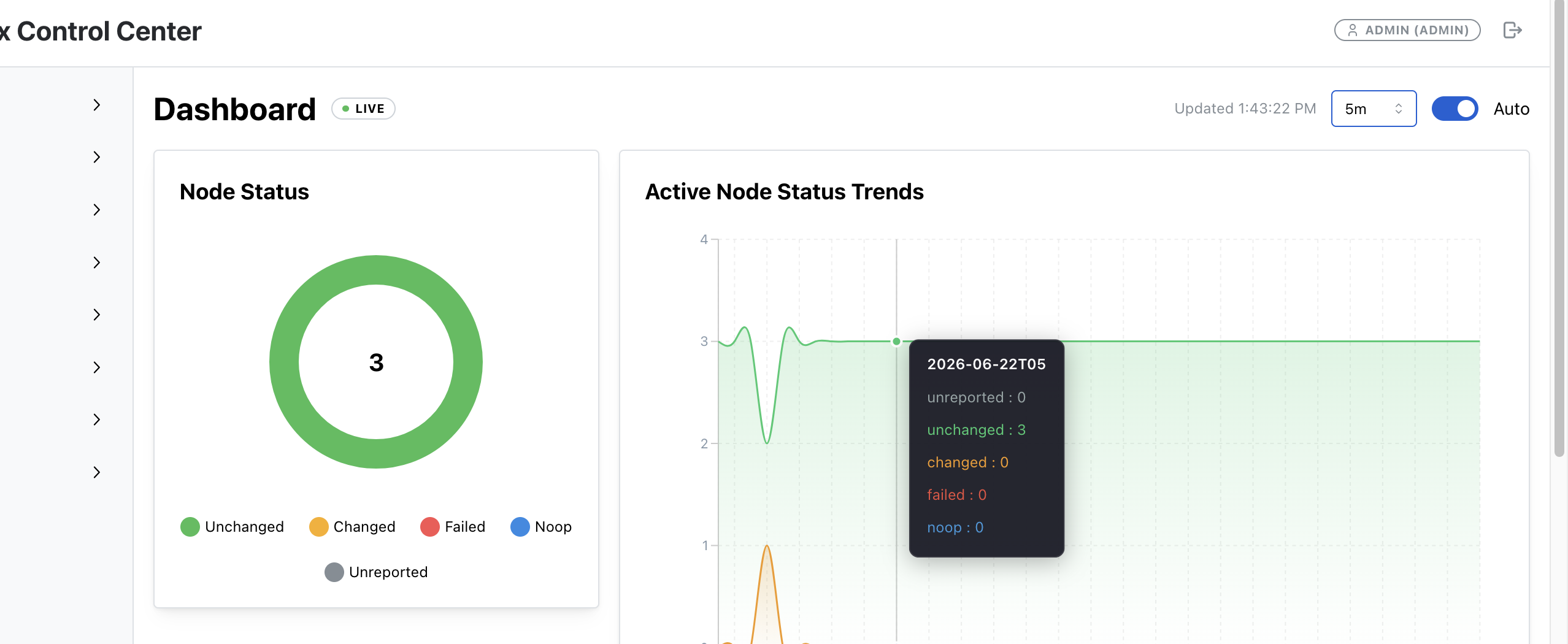
OpenVox-GUI is my open-source project. It's a web console for OpenVox: node and report dashboards from OpenVoxDB, certificate management against the CA, metrics from the compilers, and code deployment across a cluster. Everything below follows the project's README.md and INSTALL.md. When in doubt, those docs are the source of truth, and they get updated more often than this article will.
In this architecture the GUI runs as a dedicated console. It has an agent certificate signed by our CA, but it does not run openvox-server.
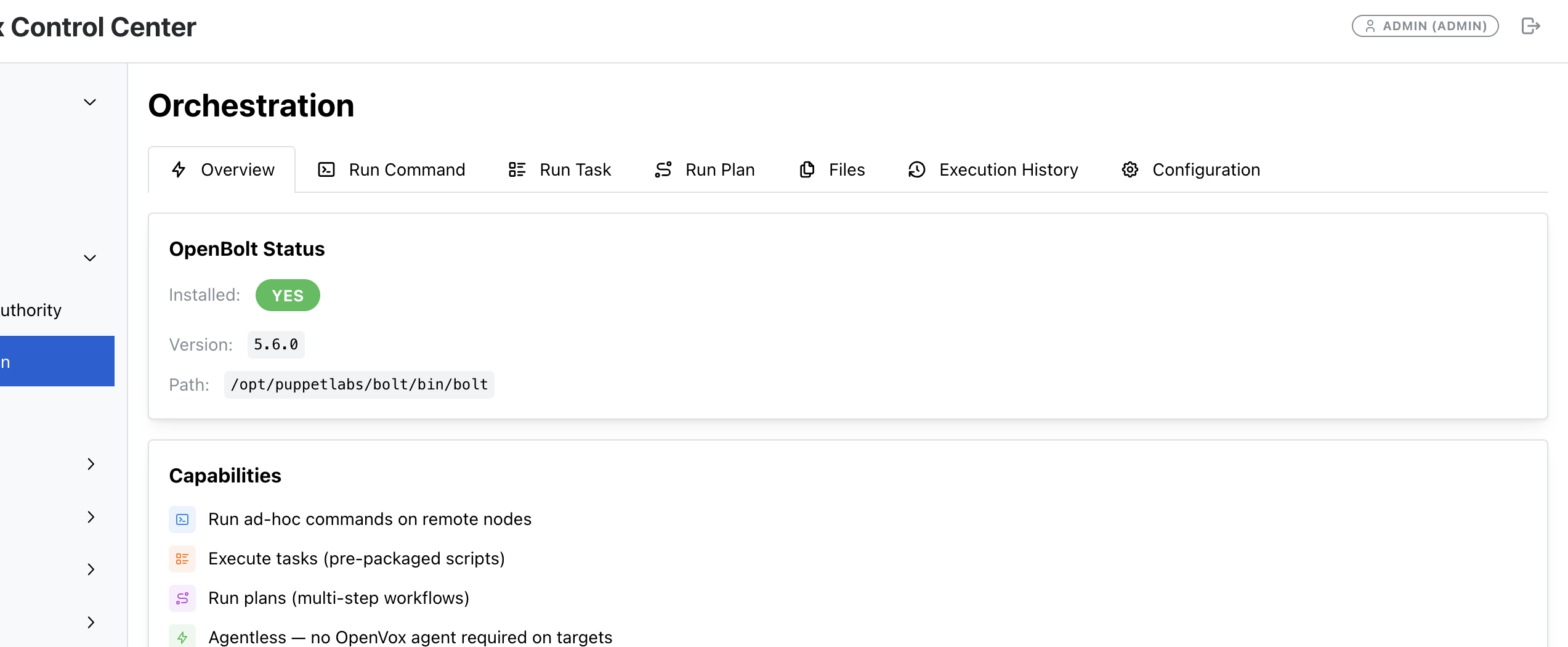
This is the piece people miss most when they leave a commercial console. Fleet status, a node with its classes, and a button that runs OpenBolt are all here, and the software is Apache-2.0.
9.1 Requirements
Per the project docs: RHEL/EL 8+ or Ubuntu 20.04+, Python 3.11+ (the installer pulls in a suitable Python on EL), 2 GB RAM minimum and 4 GB recommended, and a signed OpenVox agent certificate.
You already requested and signed gui.example.com's cert in Section 4.1. Confirm it's there:
bash
ls -l /etc/puppetlabs/puppet/ssl/certs/gui.example.com.pem \
      /etc/puppetlabs/puppet/ssl/private_keys/gui.example.com.pem \
      /etc/puppetlabs/puppet/ssl/certs/ca.pem
The GUI service runs as the puppet user by default, and that user has to be able to read the private key. install.sh handles this itself: it adds the service user to the puppet group, which can read a key that is mode 0640 and group puppet. Check it before you install, and fix it by hand if it isn't already right:
bash
ls -l /etc/puppetlabs/puppet/ssl/private_keys/gui.example.com.pem
Expect: -rw-r----- root puppet
chown root:puppet /etc/puppetlabs/puppet/ssl/private_keys/gui.example.com.pem
chmod 0640 /etc/puppetlabs/puppet/ssl/private_keys/gui.example.com.pem
usermod -aG puppet puppet
9.2 Give the GUI its own PostgreSQL database
For production, the project's policy is that the GUI keeps its own data in a separate PostgreSQL database named openvox_gui, never inside the OpenVoxDB database. SQLite is for labs only. We'll put it on pg.example.com.
The installer creates the role and database for you via its bootstrap-openvox-gui-db.sh script, connecting with a PostgreSQL superuser DSN that you provide. On pg.example.com, set a password for postgres and allow the GUI host in pg_hba.conf:
hostssl   openvox_gui   openvox_gui   192.0.2.40/32   scram-sha-256
hostssl   postgres      postgres      192.0.2.40/32   scram-sha-256   # install-time only; remove afterward
bash
sudo -u postgres psql -c "ALTER ROLE postgres PASSWORD 'CHANGE-ME-superuser';"
systemctl reload postgresql
Install a PostgreSQL client on gui.example.com so the bootstrap script has psql:
install.sh does not install a PostgreSQL client, and bootstrap-openvox-gui-db.sh stops if psql isn't on the path. Install it yourself:
bash
dnf install -y postgresql          # Debian/Ubuntu: apt-get install -y postgresql-client
9.3 Clone and configure
bash
git clone https://github.com/cvquesty/openvox-gui.git
cd openvox-gui
cp install.conf.example install.conf
Edit install.conf. These are the settings that matter for this architecture. Everything else can stay at its default:
bash
Where and how the GUI runs
INSTALL_DIR="/opt/openvox-gui"
APP_PORT="4567"Dedicated console: server = the compiler VIP, CA = the real CA (NOT the VIP)
PUPPET_SERVER_HOST="openvox.example.com"
PUPPET_CA_HOST="ca.example.com"
PUPPETDB_HOST="db.example.com"This console's own agent certificate
PUPPET_SSL_CERT="/etc/puppetlabs/puppet/ssl/certs/gui.example.com.pem"
PUPPET_SSL_KEY="/etc/puppetlabs/puppet/ssl/private_keys/gui.example.com.pem"
PUPPET_SSL_CA="/etc/puppetlabs/puppet/ssl/certs/ca.pem"Serve the UI over HTTPS on 4567 using the same cert
SSL_ENABLED="true"
SSL_CERT_PATH="/etc/puppetlabs/puppet/ssl/certs/gui.example.com.pem"
SSL_KEY_PATH="/etc/puppetlabs/puppet/ssl/private_keys/gui.example.com.pem"A dedicated console does not act as the ENC host
CONFIGURE_ENC="false"Local accounts; leave ADMIN_PASSWORD empty to have one generated
AUTH_BACKEND="local"
ADMIN_USERNAME="admin"
ADMIN_PASSWORD=""Firewall / SELinux handling by the installer
CONFIGURE_FIREWALL="true"
CONFIGURE_SELINUX="true"GUI application database on pg.example.com (production policy)
OPENVOX_GUI_DB_BACKEND="postgresql"
OPENVOX_GUI_DB_ADMIN_DSN="postgresql://postgres:CHANGE-ME-superuser@pg.example.com:5432/postgres?sslmode=verify-full"
OPENVOX_GUI_DB_APP_PASSWORD="CHANGE-ME-gui-app"
The sslmode=verify-full on the admin DSN matches the hostssl line in pg_hba.conf: the connection requires TLS and checks that it's really talking to pg.example.com.
9.4 Install
bash
sudo ./install.sh --config install.conf
(Running sudo ./install.sh with no arguments walks you through the same questions interactively. There's also --unattended.)
The installer writes the runtime configuration to /opt/openvox-gui/config/.env, using the OPENVOX_GUI_* keys (OPENVOX_GUI_PUPPET_SERVER_HOST, OPENVOX_GUI_PUPPET_CA_HOST, OPENVOX_GUI_PUPPETDB_HOST, OPENVOX_GUI_DATABASE_URL, and so on), and starts the openvox-gui service. If you didn't set an admin password, it's saved in /opt/openvox-gui/config/.credentials.
Once the install finishes, remove the temporary postgres line for the GUI host from pg_hba.conf on pg.example.com and reload PostgreSQL.
9.5 Authorize the console on the CA, compilers, and OpenVoxDB
The GUI talks to everything with gui.example.com's certificate, so those services have to allow that certname:
- OpenVoxDB:
gui.example.comis already in the certificate allowlist from Section 5.5. - Compilers (status and metrics): the project's
docs/METRICS.mdgives the exactauth.confrules to add in/etc/puppetlabs/puppetserver/conf.d/auth.confon each compiler for/metricsand/status, plus how to turn on the metrics reporters. Follow that doc rather than copying a snippet from me. - CA (certificate management): for the GUI to list and sign requests through the CA's HTTP API, the CA's
/etc/puppetlabs/puppetserver/conf.d/auth.confmust allow the console certnamegui.example.com. The project'sINSTALL.mdanddocs/METRICS.mdare the reference for that change. Restartpuppetserveron the CA afterward.
9.6 Tell the GUI it's managing a cluster
Log in at https://gui.example.com:4567 as admin. Then go to Settings → Cluster:
- Set the deployment mode to Clustered.
- List the compiler FQDNs (
compile01.example.com,compile02.example.com), the OpenVoxDB FQDN (db.example.com), and the CA member (ca.example.com). - List the code-deploy targets (the two compilers).
r10k deploy environment on every compiler over Bolt, and Stage / Activate lets you stage new code and cut all compilers over together. That's the "keep both compilers identical" problem from Section 6.9, handled from one button. The orchestration features connect over SSH as a bolt user on the target nodes. The project docs cover setting that up, plus a seed-bolt-known-hosts.sh helper.If you chose DNS round-robin in Section 7, list the two compilers individually. The GUI needs real hosts, not a round-robin name. With HAProxy, the LB node is a real host the GUI can see.
9.7 Verify the GUI
bash
sudo systemctl status openvox-gui
curl -k https://localhost:4567/health
{"status":"ok","version":"..."}
journalctl -u openvox-gui -f        # if something isn't right
The project also ships /opt/openvox-gui/scripts/estate-health-check.sh, which checks connectivity across the estate from the console's point of view. Run it once everything is up. To manage local users from the shell:
bash
sudo /opt/openvox-gui/venv/bin/python /opt/openvox-gui/scripts/manage_users.py list
---
10. Verification: Prove the Whole Thing Works
10.1 Point a test agent at the VIP
On any fresh node with the openvox9 release package installed:
bash
dnf install -y openvox-agent       # or apt-get install -y openvox-agent
puppet config set server    openvox.example.com --section main
puppet config set ca_server ca.example.com      --section main
puppet ssl bootstrap --waitforcert 60
Sign it on the CA (puppetserver ca sign --certname web01.example.com), then run:
bash
puppet agent -t
You should see the agent retrieve its plugins, submit facts, retrieve a catalog, apply it, and send a report, all through openvox.example.com. Run it a few more times. With HAProxy you'll see both compilers take traffic in /var/log/puppetlabs/puppetserver/puppetserver-access.log on each compiler, and in the HAProxy stats page.
10.2 Query OpenVoxDB directly
From a host whose certname is in the OpenVoxDB allowlist (db.example.com itself works), list the nodes OpenVoxDB knows about:
bash
curl -sG https://db.example.com:8081/pdb/query/v4 \
  --cacert $(puppet config print localcacert) \
  --cert $(puppet config print hostcert) \
  --key $(puppet config print hostprivkey) \
  --data-urlencode 'query=nodes {}'
Your test agent should be in the list, with a recent facts_timestamp, catalog_timestamp, and report_timestamp. If facts show up but catalogs don't, look at storeconfigs on the compilers. If nothing shows up, look at puppetdb.conf, the allowlist, and the compiler's puppetserver.log.
Want proof that both compilers are doing their share? Each report records which server produced it:
bash
curl -sG https://db.example.com:8081/pdb/query/v4 \
  --cacert $(puppet config print localcacert) \
  --cert $(puppet config print hostcert) \
  --key $(puppet config print hostprivkey) \
  --data-urlencode 'query=reports[certname, producer, receive_time] { latest_report? = true }'
You should see both compile01.example.com and compile02.example.com in the producer field across your nodes.
10.3 Failover drill
Do this before you go to production, not during your first outage:
1. systemctl stop puppetserver on compile01.
2. HAProxy: within a few seconds, the stats page shows compile01 DOWN. Agent runs keep succeeding against compile02.
DNS RR: some agent runs fail until you pull compile01's record and the TTL expires. That's the trade-off you signed up for.
3. Start it back up, and confirm it returns to service.
10.4 Checklist
- [ ]
puppetserver ca list --allon the CA shows every infrastructure cert, and the compiler certs carry the VIP alt name - [ ]
ss -ltnpondbshows 8081 and no 8080 - [ ] OpenVoxDB status endpoint reports
running - [ ] Both compilers answer
/status/v1/simplewithrunning - [ ] Test agent completes
puppet agent -tthrough the VIP - [ ]
nodes {}query returns the test agent - [ ] OpenVox-GUI
/healthreturnsok, and the dashboard shows your nodes - [ ] The CA directory is backed up off-box
11. Conclusion: How Many Agents Will This Support?
The honest answer is "it depends on your code." But that's not much help when you're planning hardware, so here's how to reason about it.
The OpenVox server docs describe the same relationship in words. The tuning guide sizes the JRuby pool, and the metrics page tells you what to watch when that pool runs out. Written as planning arithmetic, it's:
> j = n·s / (m·r) > j = JRubies per compiler, n = number of agents, s = average JRuby time per agent run (in seconds), m = number of compilers, r = run interval (in seconds)
Rearranged for capacity: n = j·m·r / s.
Plug in this architecture with the default 30-minute run interval (r = 1800):
- Two compilers at the default 4 JRubies each (m = 2, j = 4):
- Two 8-core compilers tuned to about 7 JRubies each (j = 7):
Those are theoretical ceilings at 100% JRuby utilization, and you never want to run there. Agents don't arrive perfectly evenly, reboots and patch windows cause thundering herds, and you need headroom to lose a compiler. Plan for 60–70% of the ceiling. Remember that with one compiler down, you're running on half.
So, for typical code, this two-compiler build comfortably supports somewhere in the range of about 1,000 to 3,000 agents. With lean code and well-tuned 8-core compilers, it can push toward 4,000 or more. Your real number comes from your own metrics, not my arithmetic. Watch JRuby borrow time (how long each request holds a JRuby) and free JRubies in the compiler metrics (which OpenVox-GUI will chart for you). The server docs' rule of thumb is that if free JRubies regularly hit zero and wait time climbs while borrow time stays flat, you simply have more agents than JRubies. Enable splay on agents to spread runs out across the interval.
What to scale first:
1. Add compilers. Compilation is almost always the bottleneck, and this design makes adding one routine: build compile03 exactly like Section 6, sign it with the VIP alt name, add it to the OpenVoxDB allowlist, the HAProxy backend (or DNS), and the GUI's cluster settings. Done.
2. Tune the compilers you have. Get JRuby counts and heap right (Section 6.7), and look hard at what's making catalogs slow. Expensive Hiera lookups and heavy custom functions show up directly in s above.
3. Then tune OpenVoxDB and PostgreSQL. A single OpenVoxDB node on a dedicated PostgreSQL server handles a lot of agents before it becomes the problem. When it does, give OpenVoxDB more heap and command-processing threads, put PostgreSQL on faster storage with more memory, and keep an eye on autovacuum and report retention (report-ttl). Watch OpenVoxDB's command queue depth. If it keeps growing, OpenVoxDB or PostgreSQL is falling behind.
4. Revisit the run interval last. Going from 30 to 60 minutes doubles capacity on paper, but it also doubles your drift-correction window. That's a policy decision, not a tuning knob.
That's the build: an independent CA you can protect, compilers you can multiply, a database tier with room to grow, and a console that shows you all of it. Most of the work is in the first afternoon. After that, scaling is just adding compilers.
If you'd like a hand designing or building an OpenVox cluster, S & S Consulting Group helps teams do exactly this. Reach us at info@ssconsultinggroup.net.
You do not need Perforce for this
Nothing in the layout above is a licensed feature. The CA split, the compilers, the load balancer, OpenVoxDB, PostgreSQL, r10k, and the console are all open source. Vox Pupuli builds and ships OpenVox. openvox-gui is Apache-2.0. HAProxy and PostgreSQL have been doing this job for a long time.
So when someone tells you that a large estate, a console, or a clustered compiler tier requires Puppet Enterprise, you can point them here. The community already has clustering, room for large installations, a capable ENC and GUI, and the tools to run it. The work is learning the layout and operating it well. That's a skills problem, and it's a solvable one.
Want a hand with it?
If you'd rather have someone who's built this sit with you while you do it, that's what we do. S & S Consulting Group installs and supports OpenVox estates: the compiler tier, the CA, OpenVoxDB, r10k, and the console. Tell us what you have and what you're trying to get to. We reply within a day, and email is fine.